Open a Smooth Spins Account and Unlock Your New Player Welcome Offer

Creating an account at Smooth Spins Casino takes under 2 minutes. You get access to 1,500+ slots, live tables, bingo rooms and the welcome free spins offer - all from a UKGC-licensed platform operated by BV Gaming Limited. This guide covers every step: what data you need, how the 3-step form works, KYC requirements and what happens immediately after registration.

Exclusive welcome deal — slots, bingo & live tables await
Sign Upwith bonus

Who Can Register at Smooth Spins

Smooth Spins Casino is available exclusively to UK residents aged 18 and over. Before you start, make sure you meet these requirements:

  • You are a resident of the United Kingdom
  • You are at least 18 years old
  • You have a valid UK mobile number (+44)
  • Your personal details match your official ID documents
  • You do not already have an active account at Smooth Spins

One account per person is strictly enforced under UKGC licence 39576. Duplicate accounts will be closed and any associated bonuses forfeited.

Smooth Spins holds an active UK Gambling Commission licence (number 39576) under BV Gaming Limited. All player data is protected by SSL encryption and accounts are subject to standard UKGC anti-money-laundering procedures.

Where to Find the Sign Up Button

On desktop, the 'Join' or 'Register' button is in the top-right corner of the homepage at smoothspins.co.uk. On mobile, the same button appears in the header. You can also reach the registration form directly from any promotional banner or the welcome offer page. If you already have a Global iD - used for Heart Radio, Capital FM or LBC accounts - you can link it at login rather than creating new credentials.

Open Registration Form

Step-by-Step Registration Process

The sign-up form is split into three screens. Each screen validates in real time - green checkmarks appear as you fill each field correctly.

Step 1 - Personal Details

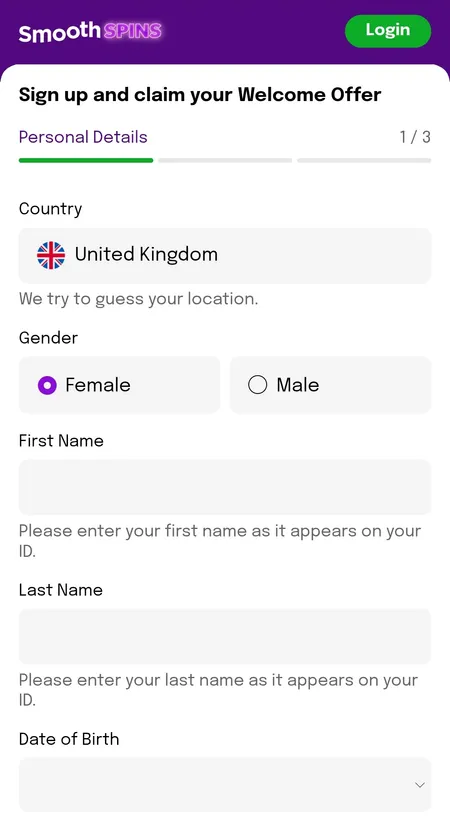
Smooth Spins registration step 1 personal details form

Step 1 asks for gender, full legal name, date of birth and a UK mobile number with the +44 prefix.

Enter your gender, first and last name exactly as they appear on your passport or driving licence, your date of birth and your UK mobile number. The country is pre-set to United Kingdom.

Step 2 - Your Address

Smooth Spins registration step 2 address entry

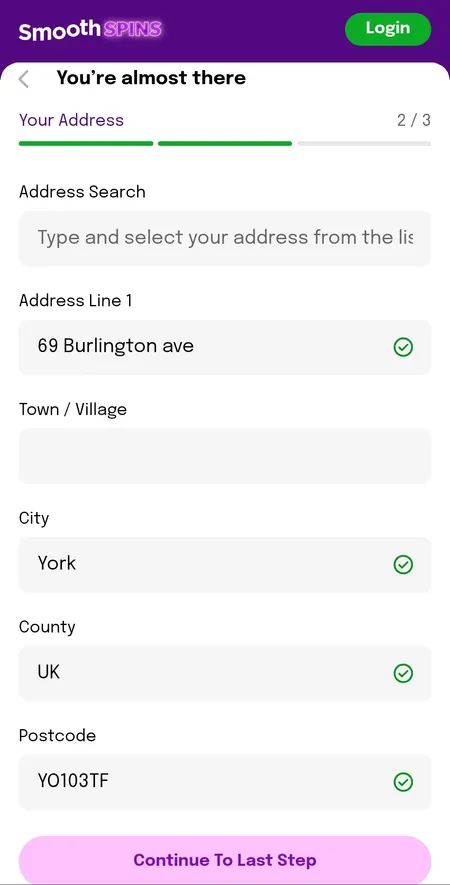
Step 2 lets you search your address by postcode or enter it manually: address line, town, city, county and postcode.

Search your address by postcode or type it manually. Fields: address line, town, city, county, postcode. Accurate address data is required - it is cross-checked during KYC.

Step 3 - Account and Marketing Preferences

Smooth Spins registration step 3 email password and marketing choices

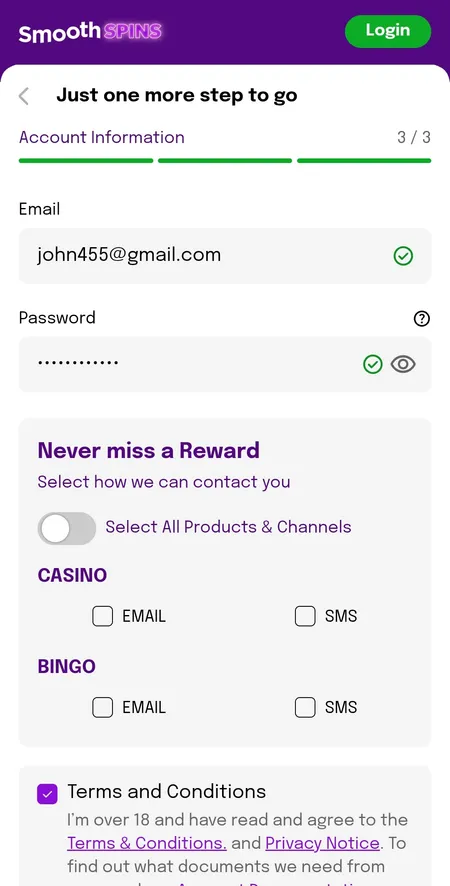
Step 3 covers email address, password creation and opt-in choices for Casino and Bingo promotions via email or SMS.

Enter your email address and choose a password. You will also see the 'Never Miss a Reward' block with separate opt-ins for Casino and Bingo promotions by email or SMS. Tick the 18+ confirmation and accept the Terms and Conditions and Privacy Notice. No promo code is needed for the standard welcome offer.

The entire process takes approximately 2 minutes on both desktop and mobile browsers.

Account created - now explore 1,500+ slots, live tables and bingo at Smooth Spins Casino.

After Registration - Bonus Selection and Verification Prompt

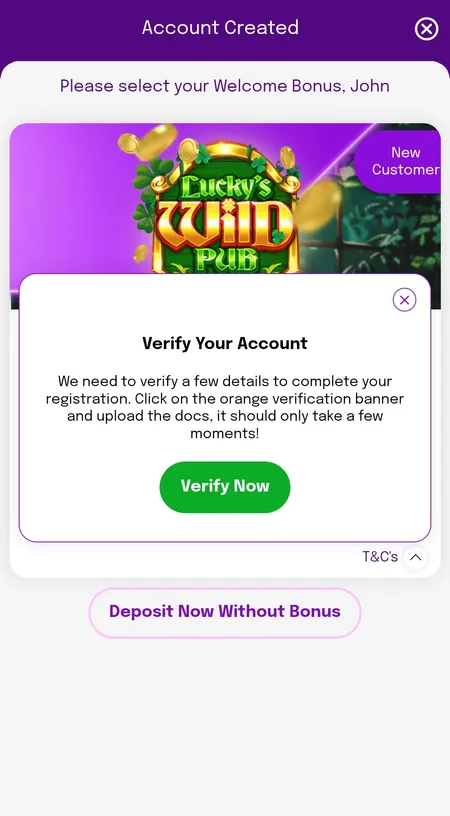
Once your account is created you land on the Account Created screen. Here you choose whether to claim the welcome offer or deposit without a bonus.

Smooth Spins post-registration bonus selection and verify account prompt

After signing up you can select the welcome free spins offer or skip it, and a Verify Your Account modal may appear immediately.

The current welcome offer for new players is up to 150 free spins on qualifying slots (Age of the Gods: God of Storms 2 or 3, or similar titles depending on the active promotion). To unlock it:

Condition Detail
Minimum deposit 10 GBP
Qualifying wager Stake 10 GBP on any game except blackjack or roulette
Timeframe Within 7 days of registration
Free spin value 0.10 GBP each
Wagering on FS wins None - winnings paid as cash
Promo code Not required

Check the full terms on the Smooth Spins bonuses page before depositing.

Claim Welcome Offer

Logging In After Registration

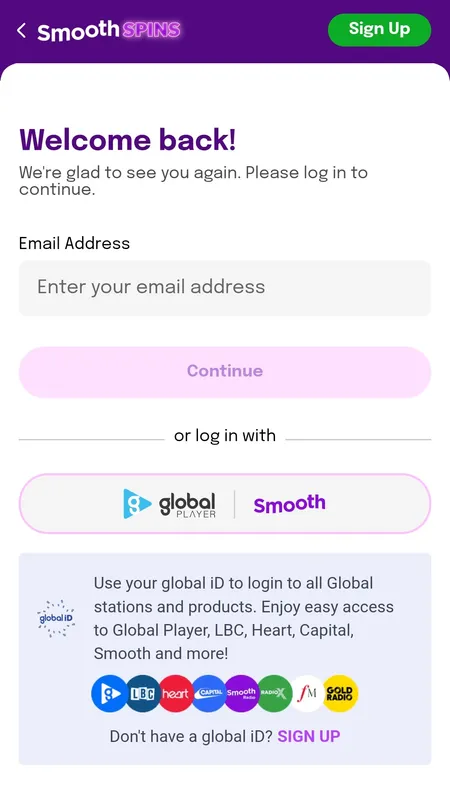
Your login credentials are the email address and password you set in Step 3. Alternatively, use the Global iD button on the login screen to authenticate through your existing Global account - the same one linked to Smooth Radio, Heart, Capital or Classic FM.

Smooth Spins login screen email and GlobaliD options

The login screen offers standard email/password entry or a one-tap Global iD sign-in for listeners already registered with Global's radio brands.

KYC Verification After Sign Up

Smooth Spins operates under strict UKGC rules, meaning identity verification is mandatory before withdrawals are processed. A 'Verify Your Account' prompt often appears immediately after registration.

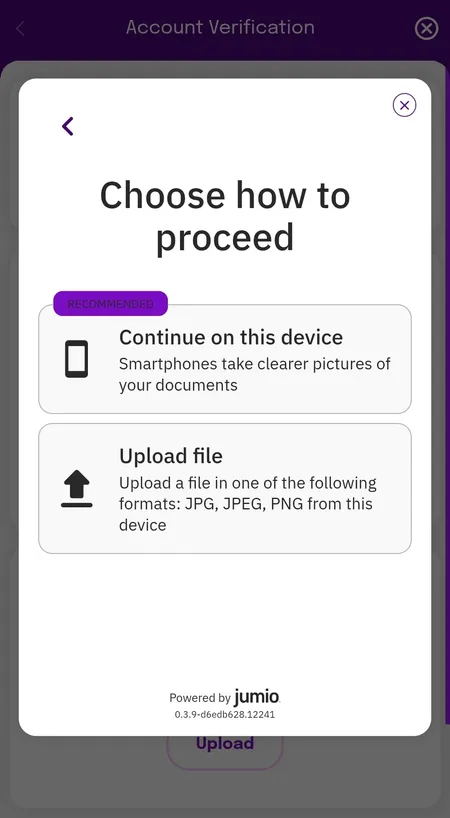
Smooth Spins Jumio KYC document upload options

The Jumio verification flow lets you photograph documents on your current device (recommended) or upload JPG/JPEG/PNG files.

Documents accepted for identity verification:

  • Passport
  • UK driving licence
  • National ID card

For address verification you need a utility bill or bank statement dated within the last 3 months. Verification is handled through Jumio and typically completes within 24 hours.

To upload documents go to My Account - Account Verification. The status shows as 'Unverified' with an orange indicator until the check is complete.

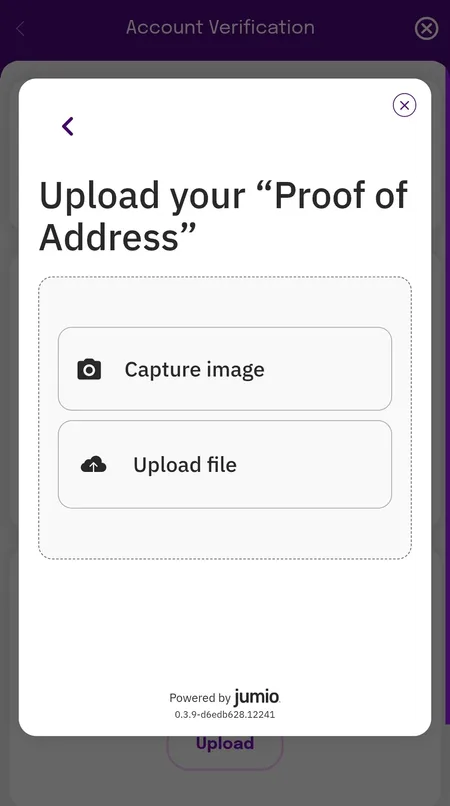
Smooth Spins KYC address document upload screen

The address verification step accepts utility bills or official government letters issued within the past 3 months.

Until KYC is complete, deposits, withdrawals and full account features are restricted. Complete verification early to avoid delays when requesting your first payout.

Your Account Dashboard After Sign Up

Once registered and verified, the account dashboard shows your main balance, bonus balance, and quick-access buttons for Deposit, Withdraw and My Activity.

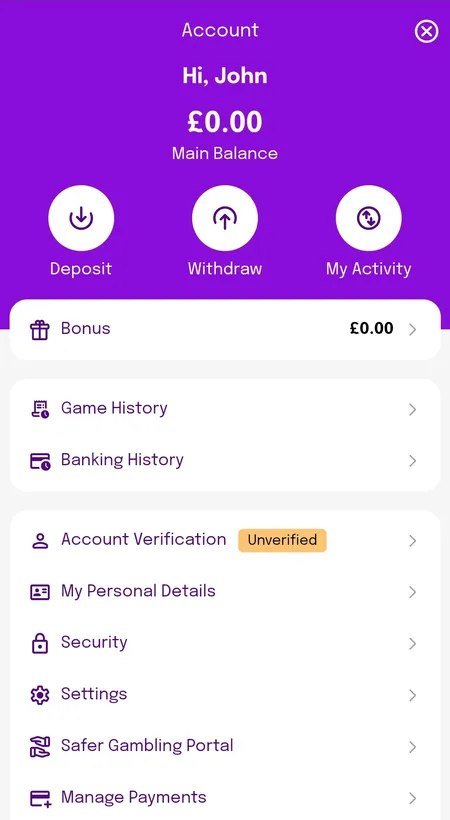
Smooth Spins account dashboard showing main balance and bonus balance

The account screen displays main balance and bonus balance separately, with shortcuts to deposit, withdraw and transaction history.

From the same screen you can manage payment methods, set deposit limits, view game history and access the Safer Gambling Portal. The minimum deposit is 5 GBP; the minimum withdrawal is also 5 GBP.

Registering on Mobile and the Smooth Spins App

The registration form is fully optimised for mobile browsers on iOS and Android. Every field works with native keyboard input and autofill. No app download is required to register - the mobile browser version gives full access to all games and account features.

A Progressive Web App (PWA) is available for Android users. On first launch it may request location permissions to confirm you are in the UK - this is a UKGC compliance requirement, not optional.

The three-step form, KYC flow and bonus selection screen all function identically on mobile and desktop. Learn more on the Smooth Spins app page.

Deposit Limits and Responsible Gambling Setup

Immediately after your first deposit you may see a 'Set Your Deposit Limit' modal. This is part of Smooth Spins' UKGC obligations.
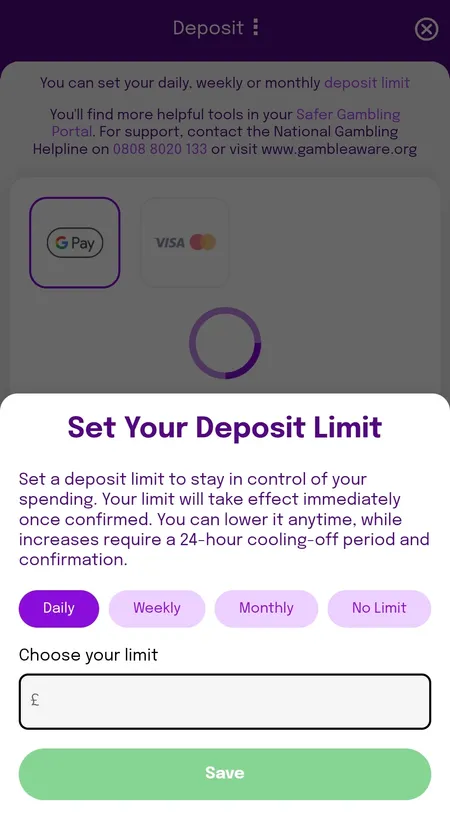
Smooth Spins set deposit limit screen daily weekly monthly

You can set daily, weekly or monthly deposit limits at registration or any time in the Safer Gambling section. Increases take 24 hours to activate.

Limits can be set as daily, weekly or monthly. Decreasing a limit applies instantly; increasing it requires a 24-hour cooling-off period. Additional tools available from day one:

  • Session time reminders
  • Loss limits
  • Time-out periods
  • Self-exclusion via GamStop

National Gambling Helpline (UK): 0808 8020 133 - free and confidential.

Ready to start? Sign up at Smooth Spins Casino, claim your welcome free spins and play 1,500+ games with a fully UKGC-licensed operator.

Registration FAQ

How long does sign up take at Smooth Spins?

The 3-step registration form takes approximately 2 minutes. You need your name, date of birth, UK mobile number, address and email ready.

Do I need a promo code to get the welcome offer?

No promo code is required. Deposit and stake at least 10 GBP on any eligible game within 7 days of creating your account and the free spins are credited automatically.

Can I register with a Global iD?

Yes. If you already have a Global account used for Smooth Radio, Heart, Capital or Classic FM, you can use the Global iD button on the login screen instead of creating separate credentials.

What documents do I need for KYC verification?

A passport, UK driving licence or national ID for identity, plus a utility bill or bank statement dated within the last 3 months for address confirmation.

How long does KYC take after sign up?

Identity checks via Jumio typically complete within 24 hours. Until verified, deposits and withdrawals are restricted.

Can I register from outside the UK?

No. Smooth Spins is licensed by the UKGC (licence 39576) and is available to UK residents only. Location is verified during registration and app launch.

What is the minimum age to register?

You must be 18 or older. This is a legal requirement under UK gambling regulations and is verified during the KYC process.

What if I already have an account?

Only one account per person is permitted. If you try to register with details already linked to an existing account, you will be redirected to the login page. Contact support via live chat 24/7 if you cannot access your existing account.

Are my personal details safe during registration?

Yes. All data submitted during registration is protected by SSL encryption. Smooth Spins is certified by eCOGRA for fair play and data security, and player funds are held in segregated accounts.

What games can I play immediately after signing up?

Once your deposit is processed you have access to the full catalogue: 1,500+ slots, 150+ live casino games and 20+ bingo rooms. Visit the Smooth Spins games page for the full breakdown.